No One From Google Will Call You About Your Account

Tonight a man from a California number called me and said someone was trying to change the phone number on my Google account. While we talked, a real Google sign-in prompt popped up on my phone. He told me he had all my passwords, then said he had emptied my crypto wallet and hung up. He had none of my passwords, and my wallet is fine. This post shows how the trick works and the one setting I turned off afterwards that you can too.
Who is Affected?
Anyone with a Gmail address and the Gmail, YouTube or Google app on their phone.
People whose email address is easy to guess, like firstname.lastname@gmail.com.
Anyone who owns crypto. Scammers buy leaked customer lists from crypto companies and name the app to sound believable.
Parents and retirees who get calls during the day and want to help when someone sounds official.
How the Scam Works
This is the order it happened to me.
The call. A man phones and says the phone number on your Google account changed 30 minutes ago. That change is why he is calling, he says, and he asks if it was you. You say no.
The prompt. He says he is sending a check to your phone. A real Google prompt appears, asking “Are you trying to sign in?” with Yes and No buttons. Mine showed up in the YouTube app.
The panic. He pushes you to tap the button now, before the “change” locks you out of your account. The rush is the point. He wants your thumb on Yes before you think.
The question. When I saw the prompt, I asked him how he had my password. That prompt only made sense if someone had typed it in, and my Gmail password is 60 characters long and used nowhere else. He said, “I have all your passwords.” Then he named my crypto wallet app, Exodus, and claimed he had that password too.
The bluff. When I would not tap anything, he said, “I drained your Exodus account,” and hung up.
He never had my password. Google has two ways to send that prompt with only your email address:
“Skip password when possible.” With this setting on, Google can offer the phone prompt to anyone who types your email on the sign-in page. Nobody needs your password first.
“Forgot password?” The account recovery page can also send a prompt to your phone.
The prompt is the whole attack. If you tap Yes, you let him into your account yourself. Everything he said on the phone was there to rush you into that tap.
The Exodus line was a bluff too. Exodus has no online login. Its password only unlocks the wallet stored on your own phone or computer, so a stranger on the phone cannot use it. I checked my computer afterwards and found no malware, and Google showed no sign-in to my account except my own.
What to Look Out For
A phone call about your Google, Apple or bank account. Google does not call you about your account.
A Yes/No sign-in prompt that shows up when you are not signing in to anything.
A caller who says the prompt is “a check” or “to cancel the change.”
Claims like “I have all your passwords,” with no proof.
The name of an app you use, dropped in to make the claim sound real.
A sudden threat (“I drained your account”) right before the caller hangs up.
How to Stay Safe
Right now, on your phone
If a prompt shows up that you did not start, tap No. Do not ignore it and do not tap Yes.
Hang up on anyone who calls about your account. Then call the company back yourself on the number from its official website.
Open your crypto, bank or payment app directly to check your balance. Do not trust what the caller says.
At your computer
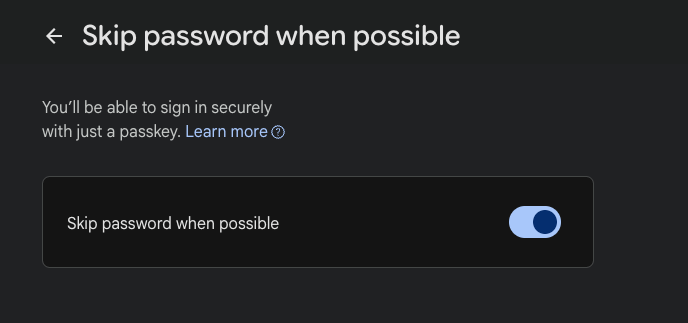
Turn off “Skip password when possible.” Go to myaccount.google.com, choose Security, then How you sign in to Google. You can still sign in with a passkey (a login stored on your phone that replaces a password).
On the same page, check Recent security activity. If you see a sign-in you do not recognize, change your password there.
Look up your email address on Have I Been Pwned to see which leaks include it. That tells you what a scammer can already know about you.
If it keeps happening
Report the call to the Canadian Anti-Fraud Centre or, in the US, the FBI’s IC3.
Read Google’s own page on sign-in prompts so you know what a real one looks like.
If the caller named a real app you use, change that app’s password and turn on its two-step check.
For more on fake support calls, see our earlier posts on fake bank calls that also steal your voice and the crypto exchange email that empties your wallet.
Conclusion
The caller had my email address, the name of my wallet app and a confident voice. He did not have my password, and he could not get in unless I tapped Yes. When a prompt shows up that you did not start, tap No and hang up.
Want to go deeper? Our free course How Not to Get Phished walks through the 4-step check that defeats most of these attacks. Confused by a prompt or a call? Ask Dave, our cybersecurity helper.
Never Miss an Alert
New posts like this one, free every week. No spam, unsubscribe any time.
Keep reading

The Fake Storage Full Email Hiding on Google
A fake "Cloud Secure" email says your storage is full and your photos get deleted today, then sends you to a payment page hosted on Google.

Fake Bank Calls That Also Steal Your Voice
A bank call that sounds completely real is now doing two jobs at once: trying to drain your account, and recording your voice so it can be cloned later.

Fake Claude AI Site Hiding Windows Malware
A fake Claude AI website is handing out Windows malware. Here's how to spot it.